
Phone Farm vs Emulator vs Cloud Phone: Differences
A phone farm is real phones in a rack, an emulator simulates a phone, a cloud phone is a rented virtual device. How they compare on cost, setup and use.
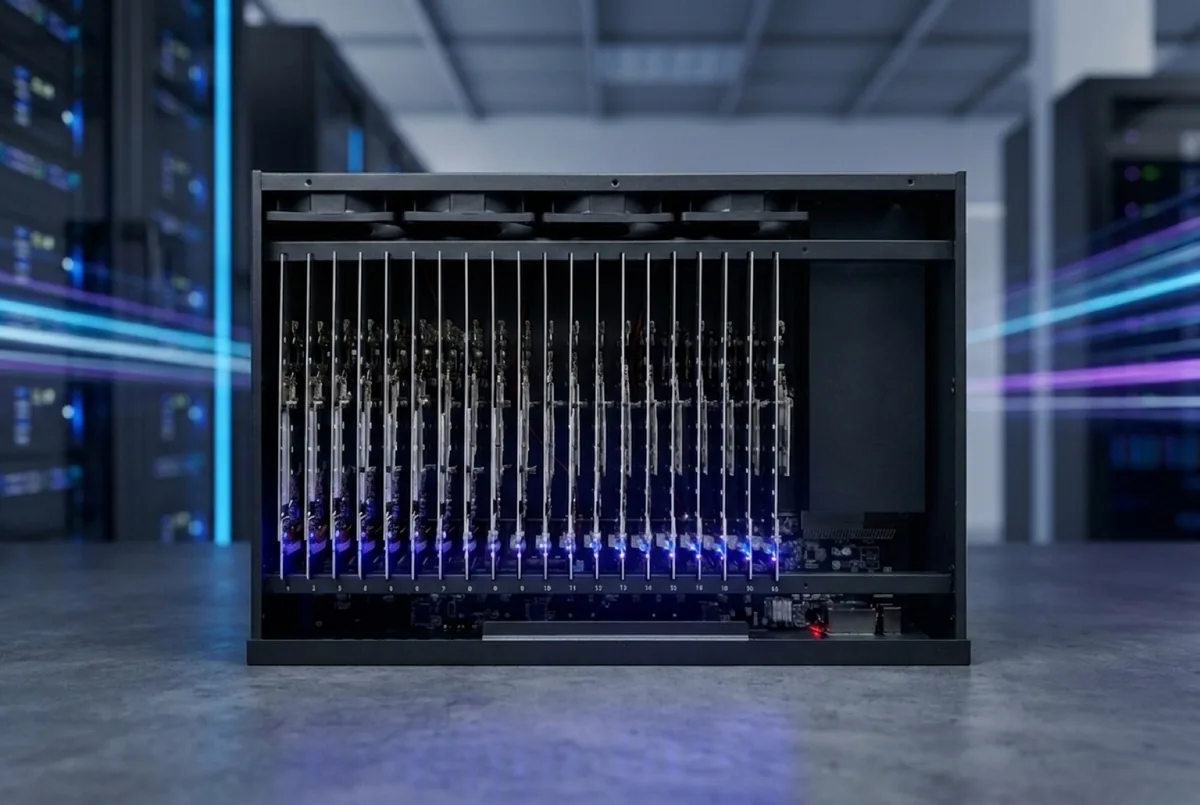
A phone farm is a rack of real, physical phones you control from a browser. An emulator is software that pretends to be a phone on a computer. A cloud phone is a virtual or remote device you rent by the hour or month from a data center. All three let you open mobile apps without holding a handset. Only one of them is actually a phone — and for teams running social media accounts, that difference is the one that matters most.
This guide compares the three setups side by side: what each one is, what it costs, where it works well and where it does not.
What is the difference in one table?
| Phone farm | Emulator | Cloud phone | |
|---|---|---|---|
| What it is | Real phones in a rack | Software on a PC or server | Virtual or remote device in a data center |
| Hardware | Physical handsets with camera and SIM slot | None — it runs on your computer | None on your side |
| Device identity | A real phone model | Simulated | Varies by provider, often virtual |
| Connection | One SIM or proxy per phone | Shares the computer's connection unless configured | Set by the provider |
| Setup effort | Box arrives assembled, or rent hosted | Install and configure yourself | Sign up and open in a browser |
| Cost pattern | Hardware up front or monthly rent, plus software | Mostly free or cheap | Monthly or hourly per device |
| Best for | Running accounts that need to look and behave like one person's phone | App testing, development, quick checks | Short tests, light use, no hardware |
The rest of this article explains each row.
What is an emulator?
An emulator is a program that imitates a phone's hardware and operating system on a desktop or server. Developers use them every day: you can launch a virtual Android device, install an app and see how it behaves on different screen sizes in minutes. Many are free.
The strengths are real:
- Speed. Spin up ten virtual devices in the time it takes to unbox one phone.
- Cost. Your existing computer does the work.
- Testing. Great for checking layouts, crashes and flows during app development.
The limits show up when you use an emulator for something other than testing. There is no real camera, no real SIM, no real sensors. The device is a simulation running on a computer, and it looks like one to any app that checks. Running many emulators on one machine also means many "phones" sharing one computer and often one connection.
What is a cloud phone?
A cloud phone is a mobile device you access over the internet, hosted by a provider in a data center. Depending on the provider, it may be a virtual Android instance or a slice of server hardware built to run many instances at once. You open it in a browser or an app and use it like a phone.
Cloud phones remove the hardware problem entirely: nothing ships, nothing needs power or cooling on your side, and you can start in minutes. That makes them handy for short projects and light use.
The trade-offs:
- You do not control the device. What it is, where it runs and what it reports about itself is up to the provider.
- Many instances often share the same underlying hardware. Ask any provider how their devices are built before you put important accounts on them.
- Costs scale per device, forever. There is no hardware you end up owning.
What is a phone farm?
A phone farm is a set of real phones — the same models people carry — mounted in a rack, powered, cooled and each given its own internet connection. You control them from one screen in a browser. Our phone farm boxes hold 20 phones each, in numbered slots, wired and burned in before they ship.
Because every device is a real phone, each one has what a real phone has: a camera, a SIM slot, the real app store and real push notifications. An account on it lives where platforms expect an account to live — on a handset, on its own connection, used at a human pace. For a longer introduction, see what is a phone farm.
The trade-off is that real phones cost more up front than software. You either buy hardware or rent a hosted rack.
Which one should you use for social media accounts?
Platforms like TikTok, Instagram and YouTube look at the device an account lives on. Emulators and virtual devices are the kind of setup platforms are built to spot, and when one is flagged, every account running on the same setup can go down together. A real phone with its own connection is simply what it looks like: one person's phone.
That does not make a phone farm a free pass. Each platform's terms of service still apply, and those terms are about behavior: spam, fake engagement, deceptive content. Teams that last run each account like a person would — warm-up before heavy posting, human timing, varied content. Real hardware makes that possible; it does not replace it. Our guide on how to warm up TikTok and Instagram accounts covers the pacing.
A simple rule of thumb:
- Building or testing an app? An emulator is usually the right tool.
- Need a phone for a few hours or a quick check? A cloud phone can be enough.
- Running accounts you care about, long term, at scale? Use real phones.
How do the costs compare?
Emulators are mostly free, so the honest comparison is between cloud phones and real phones. Cloud phone pricing varies by provider, so we will not quote numbers here — check what a device costs per month and multiply by your fleet and by the months you plan to run.
For real phones, here are our 2026 prices from the shop and the rental page:
| Route | Up front | Monthly |
|---|---|---|
| Buy an Android box (20 phones) | $1,880 + $230 freight | software from $99 |
| Buy an iPhone SE box (20 phones) | $3,700 + $230 freight | software from $99 |
| Buy an iPhone 12 box (20 phones) | $6,400, free freight | software from $99 |
| Rent 10 to 19 Samsungs, hosted | $0 | $63 per phone + connectivity |
| Rent 10 to 19 iPhones, hosted | $0 | $79 per phone + connectivity |
Freight is free above $5,000 of goods. Hosted racks include the control software; from 20 phones the rental price drops to $50 per Samsung and $63 per iPhone per month. Automations run on prepaid AI credit on top.
A bought box is an asset you keep. That is the main cost difference to a cloud phone: after the box is paid for, the monthly cost is the software licence and connectivity, not the device. The full breakdown is in how much does a phone farm cost, and rent vs buy a phone farm helps you pick between the two real-phone routes.
First-year cost of 20 real phones
| First-year cost of 20 real phones | |
|---|---|
| Buy Android box | $3,298 |
| Buy iPhone SE box | $5,118 |
| Buy iPhone 12 box | $7,588 |
| Rent 20 Samsungs | $12,000 |
| Rent 20 iPhones | $15,120 |
Is a phone farm harder to run than an emulator or cloud phone?
It used to be. A shelf of phones and a tangle of cables was a project in itself. Today the day-to-day experience is close to a cloud phone: you open a browser and see every phone.
With our control software you get:
- A live screen of every phone in the browser, ordered by slot, with taps and swipes from your laptop.
- Session logs per phone and per person, so you know who did what and when.
- Assistant access to specific phones, for a set time, revoked in one click.
- Automations for posting, account warm-up and human-like scrolling, run from the phones themselves.
The software costs $99 a month for up to 25 phones, or $249 a month for the Full version with up to 100 phones. If you would rather not handle hardware at all, a hosted rack puts real phones available on request, and you only use the browser.
What about connectivity?
This is where many emulator and cloud setups quietly fall short: lots of "devices" behind one network connection. On a phone farm, each phone gets its own connection — a carrier SIM or a mobile proxy. Our team plans connectivity with you; the options and their costs are in phone farm proxies and SIMs.
Should you choose Android or iPhone?
Once you have decided on real phones, the next question is the platform. Android boxes are the cheaper start at $1,880 for 20 phones. iPhone boxes make sense when an account has to live on iOS. We compare both in iPhone vs Android for a phone farm. Not sure which fits your plan? Ask the team.
FAQ
Is a phone farm the same as an emulator farm?
No. An emulator farm runs many simulated phones in software on one or a few computers. A phone farm is a rack of real, physical phones, each with its own connection.
Are cloud phones real phones?
It depends on the provider. Many cloud phones are virtual devices or instances sharing server hardware. Ask the provider exactly what you are renting before you move accounts onto it.
Why do teams pay more for real phones?
Because accounts live on real devices with their own connection, the way platforms expect. Emulators and virtual devices are cheaper, but they are the setups platforms are built to spot.
Can I rent real phones instead of buying them?
Yes. Hosted racks start at ten phones, billed monthly with no lock-in, available on request, control software included. See rent a phone farm.
Are emulators useless then?
Not at all. For app development and testing they are the right tool: fast, cheap and easy to reset. They are just not built to be the long-term home of accounts you care about.
Does a phone farm guarantee my accounts stay safe?
No setup can promise that. Real phones remove the device problem; how you run each account — pace, content and each platform's rules — is still up to you.
Ready to run real phones?
Buy a 20-phone farm box, rent a hosted rack, or run our control software on hardware you already own.